

Model fast. Engineer in the same model.
Build equipment, piping, and structures parametrically.
Then, analyze, coordinate, and deliver from the same engineering environment.
Up to 40% faster
Native piping + structural
Automatic + manual
IFC · Revit · E3D · STAAD · CAESAR II
Model
Route
Analyze
Coordinate
Describe the structure.
IDS™ Core builds it.
Instead of modelling repeated geometry piece by piece, define the rules that describe the structure.
Generate structure
Design by parameters, not repetition.
Build faster at the start - and make design changes without remodelling the structure from scratch.
Connect the equipment.
IDS™ Core finds the route.
Select where the pipe starts and where it needs to go.
IDS™ Core generates a route using six-direction routing logic.
Automatic when speed matters.
Auto-generate the route between connected equipment and continue engineering from the routed model.
Manual when judgment matters.
Need to clear equipment, improve access, or change the path? Take over the route manually at any point.
Auto route → Adjust → Analyze
However the pipe is created, it remains part of the same engineering model and is ready for piping stress analysis.
Fast routing without giving up engineering control.
One IDS™ Core. Three engineering workspaces.
The same project moves between modelling, piping, and structural engineering without recreating the plant for each discipline.
Integrator
Build and coordinate the plant model.
▸Equipment modelling
▸Plant layout
▸Parametric structures
▸Piping geometry
▸Multidiscipline coordination
Create the engineering model
Piping
Take the model into piping engineering, make discipline changes and analyze the system.
▸ Modify pipe routing
▸ Review piping configuration
▸ Piping stress analysis
▸ Clash checking
▸ CAESAR II output
Engineer the piping without rebuilding it
Structure
Work directly with the structural model, modidy the design and analyze multiple structures in the same project.
▸ Modify structural members
▸ Frame and geometry changes
▸ Structural analysis
▸ Multi-structure analysis
▸ STAAD output
Engineer the structures
Model once.
Let each discipline engineer it.
Integrator

Piping
Structure
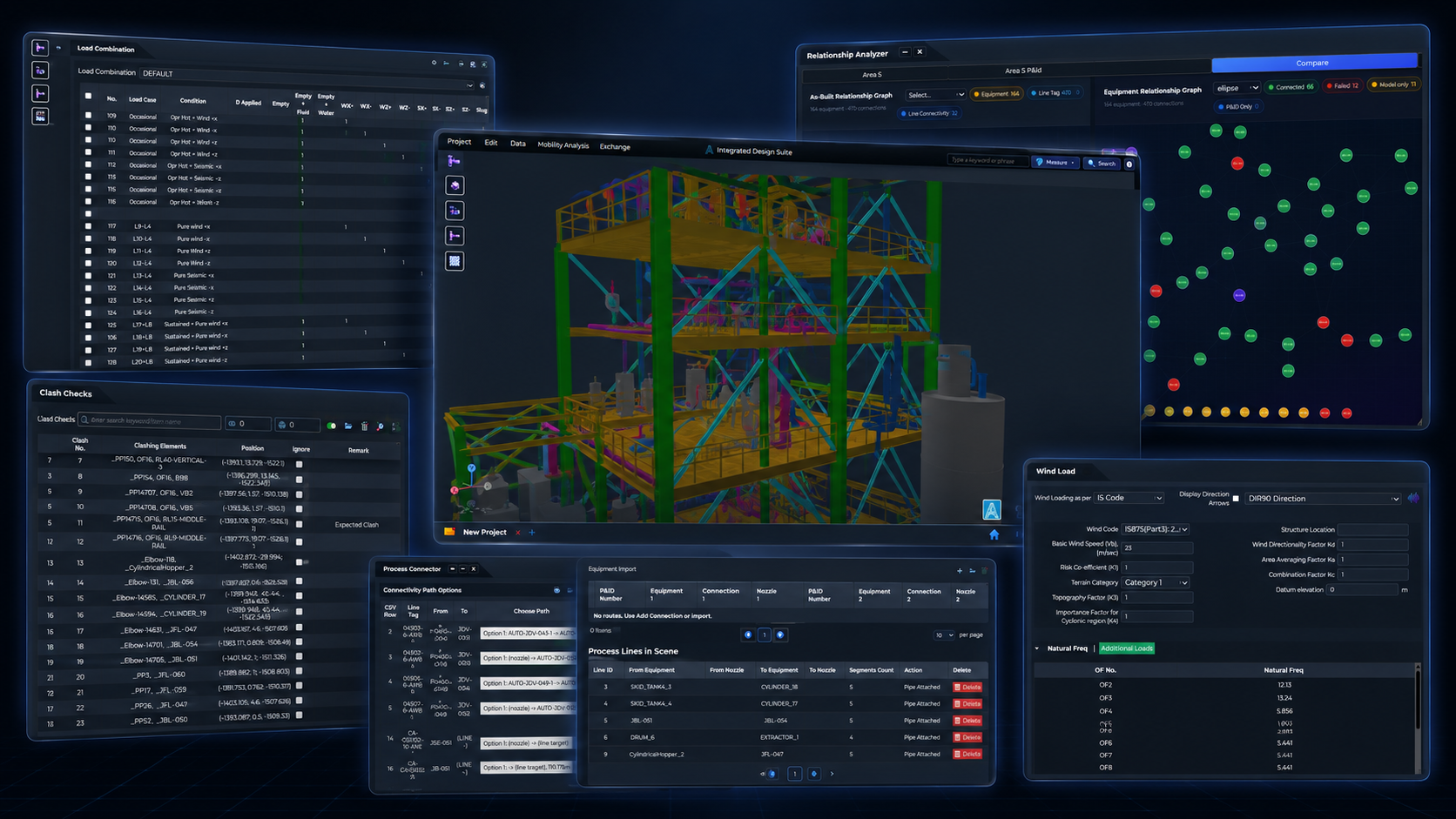
The model doesn't stop at CAD.
IDS™ Core includes its own engineering analysis engines, so design and analysis stay connected. No separate analysis model required.
Piping stress
Analyze routed piping directly inside IDS.

Structural analysis
Analyze the structures already built in the project.

Clash checking
Find conflicts between piping, equipment, and structures while the design is still evolving.
Model
Analyze
Revise
Reanalyze
Stop analyzing the plant
one frame at a time.
Traditional workflows often separate every open-frame structure into its own analysis file.
One project. Analyzed together inside IDS™ Core
Work with multiple open-frame structures in the context of the complete plant - not as isolated files.
Engineer the structural system, not a folder of individual files.
Engineer in IDS™ Core. Deliver where the project needs to go.
IDS™ Core performs the modelling and engineering itself, while keeping your existing project toolchain open.

IFC

Revit
AVEVA E3D

STAAD
CAESAR II
Use IDS™ Core for the engineering, then generate downstream files when project standards, verification, or specialist workflows require them.
IDS™ does the engineering.
Your existing tools stay connected.
One workflow from design to delivery.
Design ▸Model ▸Analyze▸Coordinate ▸Deliver
Define the plant
Generate structures parametrically
Place equipment
Route piping automatically or manually
Check clashes
Analyze piping and structures
Revise the design
Deliver to the project toolchain
Greenfield design is one part of the asset lifecycle.
IDS™ Core engineers the new build. The rest of IDS™ handles what already exists and what happens after handover.
IDS™ Halo
Turn reality capture into a structured, verified 3D model of what is already built.
REALITY ▸ VERIFIED 3D MODEL
IDS™ DataOps
Turn P&IDs, isometrics, and datasheets into structured engineering data.
DOCUMENTS ▸ STRUCTURED DATA
IDS™ Viewer
Give the wider team the engineered model and its data together.
MODELS ▸ DATA ▸ DECISIONS
Give us a greenfield unit.
See how quickly IDS™ Core can model, route, and analyze it.
Bring a representative plant layout, structural arrangement or piping system and see the workflow using your own engineering case.
30 Knowledge Park Dr, Suite 320
Fredericton, NB E3C-2R2
Canada
2, Faehrbongerten
L-5698 Welfrange
Luxembourg

© 2026 ASETS